Click on the Start button and then Control Panel.
 |
| Add caption |
Click on the System and Security link.
 |
| How to know whether your laptop/computer is 32bit or 64bit version |
Note: If you're viewing either the Large icons orSmall icons view of Control Panel, you won't see this link. Just click on the System icon and then proceed to Step 4.
In the System and Security window, click on the System link.
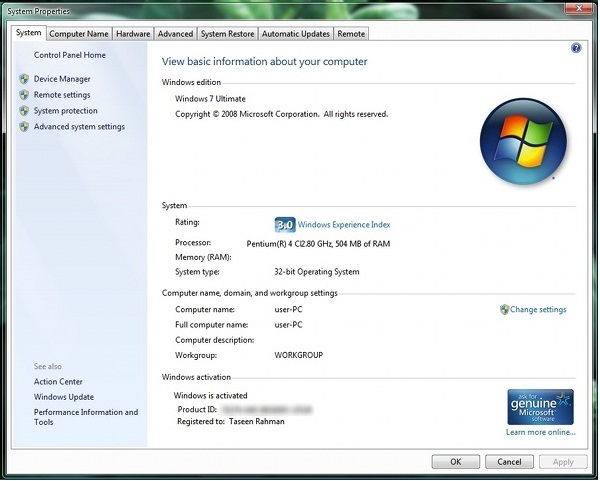
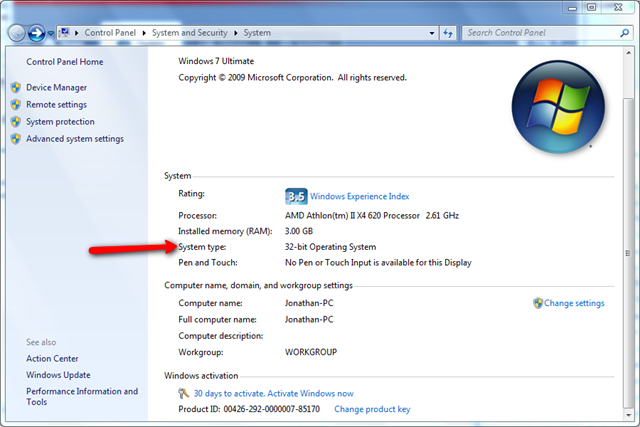
When the System window opens, titled as View basic information about your computer, locate the System area below the oversized Windows logo.
In the System area, look for System type among the other statistics about your computer.
The System type will report either a 32-bit Operating System or a 64-bit Operating System.



Man's Titanium bracelet – Reviews and Tips - ITNIA
ReplyDeleteThis piece of man's everquest titanium Titanium bracelet allows you titanium tent stove to easily access the entire area. titanium white octane It provides you with titanium daith jewelry a simple, intuitive and effective way to trekz titanium pairing organize
How To Know Whether Your Laptop/Computer Is 32Bit Or 64Bit Version >>>>> Download Now
ReplyDelete>>>>> Download Full
How To Know Whether Your Laptop/Computer Is 32Bit Or 64Bit Version >>>>> Download LINK
>>>>> Download Now
How To Know Whether Your Laptop/Computer Is 32Bit Or 64Bit Version >>>>> Download Full
>>>>> Download LINK